Checking blob with cosign - Python source code
This article is quite lengthy, as you will see it’s just a few commands, but the deeper understanding of the topic requires some background information. If you are not interested you can skip directly to the example at the end of the article (TL;DR).
cosign
Cosign is a tool well-known for signing and verifying container images. But it’s much more useful and powerful as it can also sign and verify any type of BLOB.
For most of us BLOB is just a fancy name for “something”, in most cases a file, compiled binary (especially for Linux kernel modules), or archive (tar, zip, etc). BLOB is the acronym for Binary Large OBject.
The cosign itself is owned/managed by the Linux Foundation’s sigstore project, program is written in Go language, and is open source. The official repository is located on the GitHub. One of my favorite things about golang programs/apps is that they are compiled into a single binary file (static compilation), which means that they can be easily deployed and used on any system as long as the system calls are stable, and you have proper architecture binary (amd64/x86_64, arm64/aarch64, etc).
It makes it perfect to use in containers as you can just download the binary, check the signature, and then remove the binary with extra files that it might create after use :).
Python 3.14 - PEP-761 No more GPG signatures
The PEP-761 is now in force from Python 3.14 onwards. This pep ditches the old way of verifying the Python source code with GPG signatures, it’s extensive web of trust, long lived GPG keys to a simpler, and more modern way of verifying the source code with cosign signatures.
GPG vs cosign
PGP - it’s standard called Pretty Good Privacy, and GPG - GNU Privacy Guard is the most popular implementation of this standard. The GPG is widely used for signing and verifying files, encrypting emails, and other electronic communications that you can find the PGP and GPG used interchangeably.
Gnu Privacy Guard (GPG) is a great tool for signing and verifying files, making your electronic communications more secure. However, it has some downsides including:
- Long lived, hard to manage keys
- Complex web of trust
- Difficult to use in automated systems and containerized builds. Most builds install the GPG from OS package manager, which might not have the latest version
- GPG signatures are not as user friendly as cosign signatures
- Keyservers likes to be out of sync or just down from time to time
- The GPG command line interface is notoriously difficult to master, learning it is time consuming and most people that I know just document it their own way, then forget about, as the discoverability of gpg commands in is poor
GPG advantages include:
- Well known and widely used
- It’s one of these standards that “if it ain’t broke, don’t fix it” applies
- The web of trust can be useful in many scenarios, including the journalism and whistleblowing
- It’s much more versatile than cosign
- It feels like real free/libre software in comparison to cosign/sigstore that is backed by big corporations
On the other hand cosign is doing mostly one thing, signing and verifying container images, and it’s doing it well. The advantages of cosign include:
- Uses short-lived, ephemeral keys
- OIDC (OpenID Connect) identity (e.g., GitHub(Microsoft)/Google)
- Easy to use and learn command line interface
- Designed for automated systems
- Key distribution is simpler and more reliable
- Better suited for containerized builds and automated systems
- Signature in the Rekor transparency log
Python Foundation way of veryfying the source code
The way that the Python Foundation suggests to verify the Python source code is a little abysmal for minimalistic systems and approach. The official documentation propose the following steps:
python -m pip install sigstore
python -m sigstore verify identity \
  --bundle Python-3.11.0.tgz.sigstore \
  --cert-identity pablogsal@python.org \
  --cert-oidc-issuer https://accounts.google.com \
  Python-3.11.0.tgz
In my opinion this approach has some downsides. The most obvious one is that you need the Python and pip installed on the system that is verifying the source code. It’s not good for a minimalistic, containerized build systems. Of course you can create a virtualenv, or just use multi-stage builds where one build is for verification and the second one is for actual building the Python, but it’s just more complex than it should be.
That’s why we decided to investigate it further and find a better way of verifying the Python source code with cosign directly :).
Installing Cosign and check Python source code
Installing the cosign is quite simple, you can download the binary directly from the GitHub:
# You can change the linux to darwin or windows if needed
# you can set the architecture manually if needed
TARGETARCH=$(uname -m | sed 's/x86_64/amd64/' | sed 's/aarch64/arm64/');
COSIGN_VERSION="latest"
wget -O cosign "https://github.com/sigstore/cosign/releases/${COSIGN_VERSION}/download/cosign-linux-${TARGETARCH}"
chmod +x cosign
If you want to keep the cosign binary for later use you can move it to
/usr/local/bin or any other directory that is in your PATH environment
variable.
sudo mv cosign /usr/local/bin/
Verifying the Python source code with cosign
PYTHON_VERSION=3.14.0
wget -O python.tar.xz "https://www.python.org/ftp/python/$PYTHON_VERSION/Python-$PYTHON_VERSION.tar.xz"
wget -O python.tar.xz.sigstore "https://www.python.org/ftp/python/$PYTHON_VERSION/Python-$PYTHON_VERSION.tar.xz.sigstore"
# You can use ./cosign if you didn't move the binary to /usr/local/bin
cosign verify-blob \
    --certificate-oidc-issuer 'https://github.com/login/oauth' \
    --certificate-identity 'hugo@python.org' \
    --bundle ./python.tar.xz.sigstore \
    ./python.tar.xz
In case of successful verification you should see the output similar to this:
Verified OK
The certificate-oidc-issuer and certificate-identity values are specific to
the release manager that is signing the release. The list of release managers,
their emails, and OIDC issuers can be found
in the PEP
Cleaning the files that cosign created
The simplest solution to get the files that the program is opening is to use the strace
command and then trying to grep the output for the files that are being opened.
strace cosign verify-blob \
    --certificate-oidc-issuer 'https://github.com/login/oauth' \
    --certificate-identity 'hugo@python.org' \
    --bundle ./python.tar.xz.sigstore \
    ./python.tar.xz 2>&1 | grep open
Like always there will be a lot of files, but the one that we are interested in looks like
openat(AT_FDCWD, "/home/Alex/.sigstore/root/remote.json", O_RDONLY|O_CLOEXEC) = -1 ENOENT (No such file or directory)
openat(AT_FDCWD, "/home/Alex/.sigstore/root/tuf-repo-cdn.sigstore.dev/tuf_tmp780997118", O_RDWR|O_CREAT|O_EXCL|O_CLOEXEC, 0600) = 4
openat(AT_FDCWD, "/home/Alex/.sigstore/root/tuf-repo-cdn.sigstore.dev/root.json", O_RDONLY|O_CLOEXEC) = 4
openat(AT_FDCWD, "/home/Alex/.sigstore/root/tuf-repo-cdn.sigstore.dev/timestamp.json", O_RDONLY|O_CLOEXEC) = -1 ENOENT (No such file or directory)
openat(AT_FDCWD, "/home/Alex/.sigstore/root/tuf-repo-cdn.sigstore.dev/tuf_tmp3153099839", O_RDWR|O_CREAT|O_EXCL|O_CLOEXEC, 0600) = 4
openat(AT_FDCWD, "/home/Alex/.sigstore/root/tuf-repo-cdn.sigstore.dev/root.json", O_RDONLY|O_CLOEXEC) = 4
So it’s just a matter of removing the .sigstore directory from your home directory.
rm -rf ~/.sigstore
TL;DR - Checking the Python Source Code with Cosign
TARGETARCH=$(uname -m | sed 's/x86_64/amd64/' | sed 's/aarch64/arm64/');
COSIGN_VERSION="latest"
PYTHON_VERSION=3.14.0
wget -O cosign "https://github.com/sigstore/cosign/releases/${COSIGN_VERSION}/download/cosign-linux-${TARGETARCH}";
chmod +x cosign

wget -O python.tar.xz "https://www.python.org/ftp/python/$PYTHON_VERSION/Python-$PYTHON_VERSION.tar.xz"
wget -O python.tar.xz.sigstore "https://www.python.org/ftp/python/$PYTHON_VERSION/Python-$PYTHON_VERSION.tar.xz.sigstore"
# You can use cosign if moved the binary to /usr/local/bin or any other directory in your PATH environment variable
./cosign verify-blob \
    --certificate-oidc-issuer 'https://github.com/login/oauth' \
    --certificate-identity 'hugo@python.org' \
    --bundle ./python.tar.xz.sigstore \
    ./python.tar.xz
rm -rf ~/.sigstore
Conclusion
The cosign is a great tool for signing and verifying files, especially in containerized workflows and automated systems. The Python Foundation’s decision to use cosign for signing is controversial. On the one hand, it modernizes the process, it’s easier for release managers and for users, the short lived keys are much safer than long lived GPG keys. In many aspects it’s win-win situation, but it also has some discussable downsides, still it feels like a step forward.
The Sourcemation Python 3.14 container images uses the method described in this article to verify the source code before building the images, adding small step to the supply chain security of images that you are using in your projects.
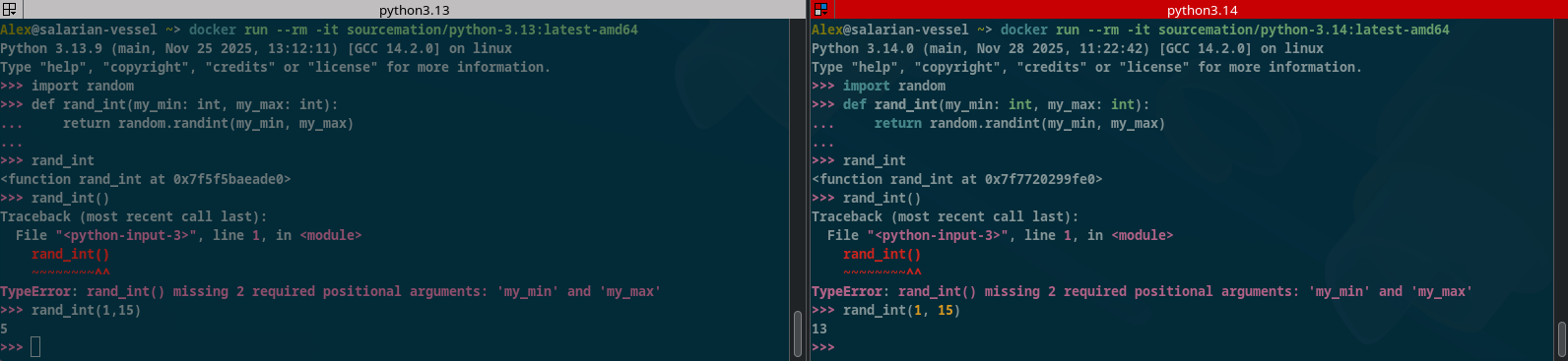
Our favorite cool feature of Python 3.14 are colors in the REPL :)